Touchless trash can keeps opening and closing
A lid that opens when nobody is there is not a broken sensor nine times out of ten. It is something in front of the sensor eye, light falling on it, or a set of batteries on the way out - and all three are free to fix.
By Ryder M. · Last reviewed October 17, 2026

Lid & Liner is reader-supported. If you buy through a link on this page we may earn a commission at no extra cost to you. It never changes which product we rank first — how we pick and how we make money.
The short answer
Move the can so nothing sits within about ten inches of the sensor eye, keep direct sunlight and strong lamp light off it, and check for the clear protective sticker that ships over the sensor window. Those three account for most cases. If the lid is still cycling, change the batteries as a set - a tired set makes a sensor erratic long before it stops working - and then do a full reset by removing the power for a couple of hours.
The checks, in order
Step 01
Look for the sticker
Sensor cans ship with a thin transparent protector over the sensor eye, and it is easy to miss on a brushed steel lid. Peel it off, then wipe the window with a dry microfiber cloth. iTouchless specifically calls this out as a cause of a lid that stays open, randomly opens, or shows a constant indicator light.
Step 02
Clear the ten inches in front of the sensor
Nothing should sit within about ten inches of the sensor eye - and that includes things that move through the space: a cupboard door that swings past, a bar stool, a curtain, a dog's tail, a bin bag box on the counter above. Put the can in an open spot and watch it for a minute.
Step 03
Get the light off it
Direct sunlight, a downlight aimed straight at the lid, or a bright reflective surface opposite the sensor can all keep it firing. Rotating the can so the sensor faces away from the window usually fixes it without moving anything else.
Step 04
Change the batteries as a set
Not one cell - all of them, same brand, alkaline. A can near the end of its battery life behaves erratically rather than simply dying: lids that half open, cycle, or chatter are classic symptoms. If the can has an AC adapter option and it sits near an outlet, that ends the problem permanently.
Step 05
Do a hard reset
Sensor cans learn their open and close distances, and that calibration can drift if the lid has been blocked while opening or manually pushed shut repeatedly while switched on. iTouchless advises removing the batteries or the adapter and letting the can sit for at least two hours before powering it back up - which clears the stored distances.
Step 06
Rule out the lid itself
If it still cycles with fresh batteries, a clean sensor, no light on it and clear space in front, you are into hardware: a lid switch or the sensor module. That is a parts question rather than a setup one - see touchless trash can replacement parts below.
The behaviour that is not a fault
Two things get reported as faults constantly and are both working as designed.
- The lid closes while you are still using it. Budget sensor cans close on a fixed timer, not on whether something is still there. That is a design limit, not a failure - use the manual mode to lock the lid open for a long job. Only the premium adaptive sensors hold the lid while your hand is present.
- The lid opens as you walk past. An infrared sensor has a cone, not a point. If the can sits in a doorway or beside a walkway, passing traffic is inside that cone. Move the can rather than returning it.
The opposite symptom - a lid that will not open at all - has a different check order, and touchless lid not opening walks through it. If it is the lid mechanism rather than the sensor, touchless trash can replacement parts covers which brands actually stock spares.
If you are replacing it
Replace for the cause. If the can was in a sunny spot and nothing fixed it, a filtered lid and an AC-adapter option are worth more to you than a brand name. If the real complaint was the timer closing on your wrist, the only genuine cure is an adaptive sensor, and that is a premium purchase - be clear-eyed that you are paying for one feature.
The AC-adapter option, the one with a published battery figure, and the adaptive-sensor can if the timer is what you are escaping.
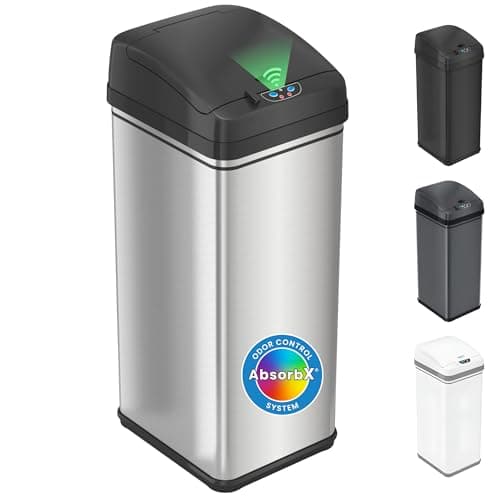
Best touchless value
iTouchless 13 Gallon SensorCan with AbsorbX Odor Filter
The touchless can that ships with a carbon filter in the lid and takes ordinary 13-gallon bags, at a fraction of the premium price.
$89.99 · 11% off · Price as of October 17, 2026. #ad How we make money
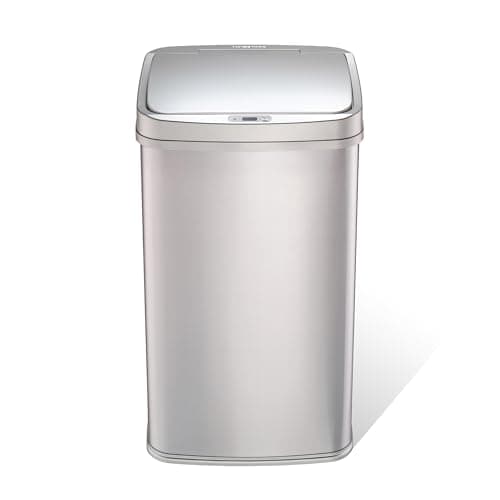
Best published battery life
Ninestars 13 Gallon Rectangular Motion Sensor Trash Can
The rectangular Ninestars, and the only sensor can in this price class that publishes how long a set of batteries lasts.
Price as of October 17, 2026. #ad How we make money
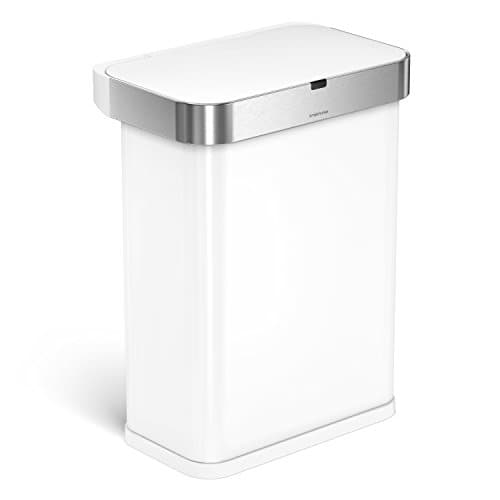
Best touchless overall
simplehuman 58L Sensor Can
The touchless can that gets the sensor right — it reads how long you are standing there rather than running a fixed timer.
Keeping it from coming back
- Site the can once, properly. Open floor, sensor facing away from the window, nothing that swings through the space in front of it.
- Wipe the sensor window when you change the bag. Thirty seconds, and it prevents the commonest intermittent fault.
- Diarise the batteries. Changing them on a schedule rather than on a symptom removes most of this page from your life.
- Do not push the lid shut by hand while it is switched on. On cans that learn their travel, that is what drifts the calibration.
Common questions
Why does my touchless trash can keep opening by itself?
Almost always something in the sensor's path, light falling on the sensor window, or tired batteries. Clear about ten inches in front of the eye, keep direct sunlight off it, peel off the shipping sticker, and change all the batteries as a set.
Can sunlight set off a motion sensor trash can?
Yes. The lid is triggered by an infrared beam and sunlight contains infrared, so direct sun on the sensor window can make the can open at random or ignore your hand. Rotate the can away from the window.
How do I reset a touchless trash can?
Remove the batteries or unplug the adapter and leave it without power for at least two hours, then power it up again. That clears the stored open and close distances, which can drift if the lid has been blocked or pushed shut by hand.
Why does the lid close while I am still throwing something away?
Because budget sensor cans close on a fixed timer rather than sensing that something is still there. Use the manual mode to hold the lid open. Only adaptive sensors wait for your hand to leave.
Does a reflective surface affect a sensor trash can?
It can. A bright reflective surface directly opposite the sensor, or a strong downlight aimed at the lid, gives the beam something to bounce off. Moving or rotating the can is the fix.
Should I just use the manual mode permanently?
You can, and plenty of people do while cooking - but a lid locked open stops containing odor. Fix the siting instead and keep manual mode for long jobs.
Sources
Every specification on this page traces to one of these, checked at the time of writing. Where a manufacturer does not publish a figure, the page says so rather than estimating it.
- iTouchless sensor can owner's manual - troubleshooting (sensor sticker, 10-inch clearance, sunlight, 2-hour power-off reset)
- iTouchless sensor can instruction manual (sensor placement and battery guidance)
- iTouchless - 13 Gallon Sensor Can (power options including AC adapter, lid lock, warranty)
- Ninestars USA - Rectangular Motion Sensor Trash Can, 13 Gallon (manual mode, battery spec)
Read next
- Touchless Trash CansSensor cans that do not close on your hand, plus battery life and the lid fix.
- Touchless trash can lid not openingSix checks in order of cost, and an honest point at which to stop repairing.
- Touchless trash can replacement parts, brand by brandWhich sensor-can parts are genuinely sold, how to identify yours, and when a part costs more than the replacement can.
- Touchless trash can batteries and powerWhat each brand takes, how long it lasts, and when mains power pays off.
- The best affordable touchless trash cansFour budget touchless cans compared - and the single feature that separates all of them from a premium sensor can.
- How motion sensor trash cans workWhat the sensor actually detects, and why that explains every misfire.
The author
Ryder M.
Owner and editor of Lid & Liner, published by Magoo Media Group. He started the site after getting tired of the same problem everyone has: every “best trash can” article covers ten products and none of them tells you whether a 13-gallon bag actually fits a 13-gallon can. Lid & Liner covers one category and tries to cover it completely.
Last reviewed October 17, 2026. Spotted an error? Tell us and we will correct it and note the correction.